XRay Textures Pack – Transparent Ores & Blocks [26.1.1, 1.21.x, 1.20.x]
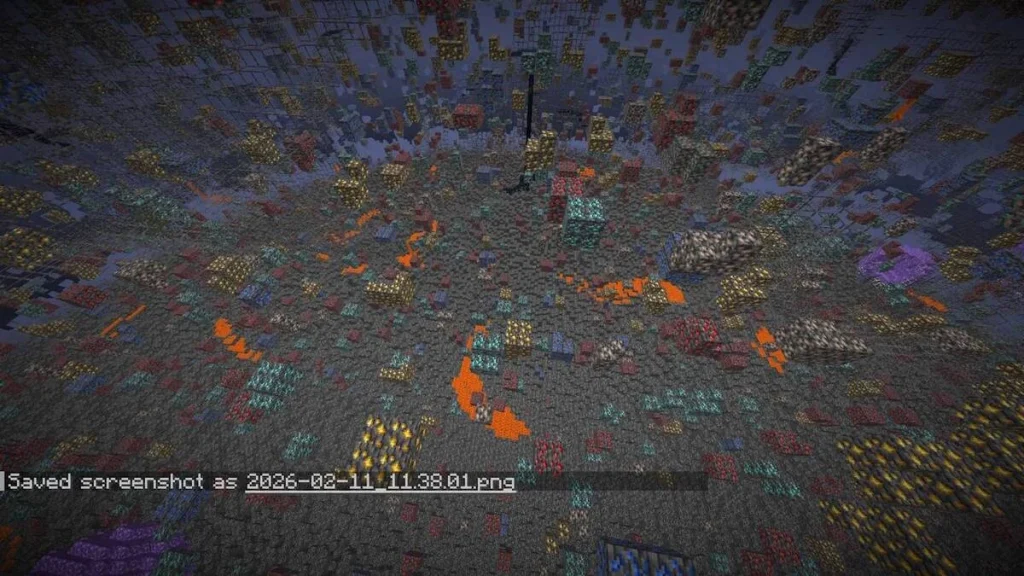
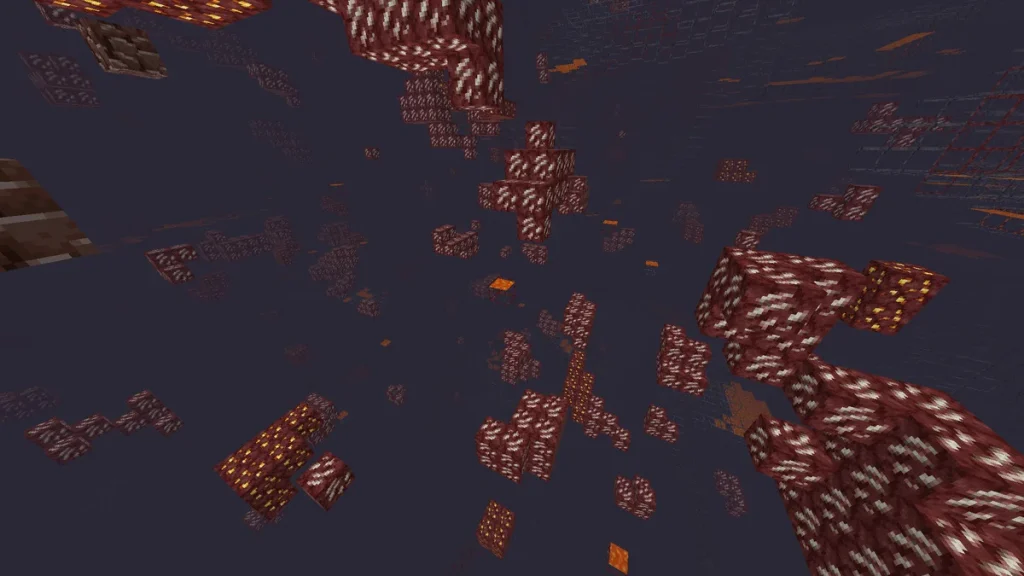
The XRay Textures Pack is the ultimate Minecraft resource pack designed to make standard terrain blocks transparent while vividly highlighting valuable ores. Whether you are mining in the Overworld for diamonds and iron or exploring the Nether for ancient debris, this texture pack instantly simplifies your gameplay. Recognized as one of the most classic and […]
The XRay Textures Pack is the ultimate Minecraft resource pack designed to make standard terrain blocks transparent while vividly highlighting valuable ores. Whether you are mining in the Overworld for diamonds and iron or exploring the Nether for ancient debris, this texture pack instantly simplifies your gameplay. Recognized as one of the most classic and reliable resource pack cheats in Minecraft history, it eliminates the endless grind of strip mining.
If you want to make your survival experience easier and save hours of searching for resources, this pack is exactly what you need.
XRay Resource Pack Features
To ensure maximum efficiency while mining, this pack focuses on visual clarity and performance:
- Total Block Transparency: Automatically hides useless blocks like dirt, stone, gravel, and netherrack.
- High-Visibility Ores: Clearly displays valuable resources (Diamonds, Gold, Iron, Emeralds, Lapis Lazuli) through walls.
- Cross-Dimension Support: Works flawlessly in both the Overworld and the Nether.
- Lightweight & Fast: Does not drop your FPS; suitable for low-end PCs.
Pack Details & Compatibility
| Feature | Details |
| Category | Resource Pack / Texture Pack / Cheat |
| Supported Versions | 26.1.1, 1.21.x, 1.20.x, 1.19.x (and older) |
| Supported Dimensions | Overworld, The Nether |
| Primary Use | Fast mining, Resource gathering |
How to Install the XRay Texture Pack
Installing this resource pack is quick and requires no additional mod loaders like Forge or Fabric. Follow these exact steps:
- Download the XRay Texture Pack
.zipfile corresponding to your Minecraft version. - Launch Minecraft, navigate to Options, and click on Resource Packs.
- Click the “Open Pack Folder” button (this opens the
.minecraft/resourcepacksdirectory on your PC). - Copy and paste (or drag and drop) the downloaded
.zipfile into this folder. - Return to the game menu. Find the XRay pack in the left column, click the arrow to move it to the right (“Selected” column), and click Done.
⚠️ Important Usage Disclaimer: Using XRay resource packs gives you a massive unfair advantage! To avoid getting banned by server anti-cheat plugins, it is highly recommended to use this pack exclusively in single-player mode or on private servers with your friends.
Frequently Asked Questions (FAQ)
An XRay Texture Pack is a custom visual modification that turns common, low-value blocks invisible. This allows players to see straight through the ground to locate rare ores, hidden caves, and underground structures instantly.
Yes, this specific version of the pack is fully updated, optimized, and tested to work perfectly with Minecraft 1.21.x, 1.20.x, and various older legacy versions.
While OptiFine is not strictly required to make the blocks transparent, using OptiFine (or a modern alternative like Sodium with continuity mods) is highly recommended. It enables features like “Fullbright,” which illuminates the underground ores so you can see them clearly without placing torches.
Yes, if used on public multiplayer servers. Server administrators consider XRaying a form of cheating, and most modern servers have anti-XRay plugins that can detect abnormal mining patterns. Always use it in single-player worlds.
Useful links
Available Files
- mahis-xray-pack-v1.0.0-1.13-1.14.4.zip 1.14.4 • 360.50 KBChoose File
- mahis-xray-pack-v1.0.0-1.15-1.16.1.zip 1.16.1 • 360.50 KBChoose File
- mahis-xray-pack-v1.0.0-1.16.2-1.16.5.zip 1.16.2 • 360.50 KBChoose File
- mahis-xray-pack-v1.0.0-1.17-1.17.1.zip 1.17.1 • 360.50 KBChoose File
- mahis-xray-pack-v1.0.0-1.18-1.18.2.zip 1.18.2 • 360.50 KBChoose File
- mahis-xray-pack-v1.0.0-1.19-1.19.2.zip 1.19.2 • 360.50 KBChoose File
- mahis-xray-pack-v1.0.0-1.19.4.zip 1.19.4 • 360.50 KBChoose File
- mahis-xray-pack-v1.0.0-1.20-1.20.1.zip 1.20.1 • 360.50 KBChoose File
- mahis-xray-pack-v1.0.0-1.21-1.21.1.zip 1.21.1 • 360.50 KBChoose File
- mahis-xray-pack-v1.0.0-1.21.11.zip 1.21.11 • 360.50 KBChoose File
- mahis-xray-pack-v1.0.0-1.21.4.zip 1.21.4 • 360.50 KBChoose File
- mahis-xray-pack-v1.0.0-1.21.5.zip 1.21.5 • 360.50 KBChoose File
- mahis-xray-pack-v1.0.0-1.21.7-1.21.8.zip 1.21.8 • 360.50 KBChoose File
- mahis-xray-pack-v1.0.0-1.21.9-1.21.10.zip 1.21.10 • 360.50 KBChoose File
- mahis-xray-pack-v1.0.0-26.1.1.zip 26.1.1 • 360.50 KBChoose File
Keep exploring the same resource family

Fresh Moves Texture Pack [1.21.4, 1.21.3, 1.21.2]
Required Mods and Versions for Fresh Moves To use this pack, install the latest versions of Entity Model Features (v2.0.2 or later) and Entity Texture Features (v6.0.1 or later). These client-side mods are compatible with both Forge and Fabric loaders. Version Matching for Animated Eyes Always select the correct version of the pack that matches […]
No comments yet